When we run algorithms on hardware, we’re bounded by three things: how fast our computer can do math (OPs/second), the bandwidth available for moving data around (bytes/second), and the total memory available to store data (bytes). These “roofline” constraints let us upper and lower bound the time of a given computation in source
Where Does the Time Go?
So, let start by understanding why an algorithm takes a certain duration like 50ms, 500ms or something else, what actually happens within the model that takes this much time and how can we estimate how much time it’ll take for an algorithm to run?
Computation
Basically, in Deep Learning we essentially do a bunch of matrix multiplications and each of those matrix multiplications are composed of floating point multiplication and addition operations (FLOPs). To calculate how much time it’ll take for our accelerators (GPU, TPU), it really depends on the computation speed of our accelerator:
So, for example lets say we want to calculate how much time it’ll take to compute 1e12 FLOPs on an H100? We can say that H100 can perform 9.89e14 bfloat16 FLOPs/s. Hence, the total time it’ll take will be 1e12 / 9.89e14 = 1.01ms
Computation within a Chip
Ok, before diving this, I gotta understand couple of concepts, so lets’ get into that first.
On a high level thing, GPU has its own separate hardware for storing data and performing calculations. Before GPU performs any calculations, it needs the required data to be available to its compute units
This section is all about how quickly the data can move between ???
What is HBM?
HBM stands for High Bandwidth Memory
It is a type of DRAM used by high-performance accelerators such as NVIDIA H100 GPUs and Google TPUs.
HBM stores numerical data used during machine learning computations, including:
- Model weights (parameters)
- Input tensors
- Intermediate activations
- Output tensors
- KV cache during LLM inference
For example, suppose you have a matrix:
If this matrix is stored using BF16, each of the four numbers requires 2 bytes
Therefore, the matrix requires:
Those 8 bytes could be stored in the GPU’s HBM
An NVIDIA H100 SXM GPU has 80 GB of HBM3 memory. This is its memory capacity: the amount of data it can hold
What are Compute Cores?
Compute cores are the hardware execution units that are used for performing mathematical operations
Modern GPUs contain different types of execution units:
- CUDA cores: Execute general-purpose arithmetic, including floating-point operations
- Tensor Cores: Specialized units that accelerate matrix operations, particularly important for machine learning
Google TPUs use specialized matrix multiplication units (MXUs), along with vector and scalar units
The distinction is that HBM stores numbers, while compute units perform operations on numbers
What does transferring tensors mean, and why is it necessary?
The crucial thing is that mathematical operations are performed by the compute hardware, not by the HBM memory chips
HBM stores the operands. The compute units need those operands in their local storage to execute their instructions
Once the operation finishes, the result can be written back into HBM so it can be used in subsequent computations
The GPU may also reuse data already loaded into registers or on-chip memory, reducing how often it accesses HBM This becomes extremely important in efficient matrix multiplicatio
What does HBM bandwidth mean?
HBM bandwidth measures the rate at which data can be transferred between HBM and the accelerator’s on-chip memory and compute subsystem
ok, now lets get back to the point
Within an accelerator, tensors need to be transferred between accelerator memory (HBM) and the compute cores. You’ll see the bandwidth of this link referred to as “HBM bandwidth”. 4 On an H100, this is about 3.35TB/s and on TPU v6e this is about 1.6TB/s in source
Computation Between Chips
Generally we distribute a model between multiple accelerators and we need to frequently transfer tensors between them so that we can make the compute happen. There are some options that we can use to do this transfer thing across accelerators: ICI, DCN, and PCIe and each of these has different bandwidths
Whether the communication is within a chip or between chips, we measure this in bytes/s and estimate the total communication time with in source:
In this equation, we are trying to estimate how long it’ll take to move a certain amount of data
T_comms -> Time spent transferring data in seconds
Communication Bytes -> Total amount of data that needs to be transferred
Bandwidth Bytes/s -> Amount of data the hardware can transfer per second
Notice that the equation works for two kinds of communication:
- Within a GPU: Transferring tensors between HBM and on-chip memory, using HBM bandwidth
- Between GPUs: Transferring tensors from one GPU to another, using an interconnect such as NVLink
In both cases, the calculation is conceptually identical. The bandwidth numbers and hardware involved are different
Typically (but not always), computation within a single chip can be overlapped with communication within a chip and between chips. This means we can lower-bound training and inference time by using the maximum of computation and communication time. We can also upper-bound with their sum in source
In practice, we optimize against the maximum as the algebra is simpler and we can usually come close to this bound by overlapping our communication and computation. If we optimize with the maximum in mind then the lower and upper bounds differ by at most a factor of 2 since . We then increase accuracy beyond this by modeling ‘overlap regions’ and overheads, which can be informed by profiling your specific model and target system in source
What does it mean by “the lower and upper bounds differ by at most a factor of 2”?
This is the mathematical statement:
I’ll derive this thing later but for now I understand the intuition behind it
TODO: Derive the above equation and understand clearly
What are "overlap regions" and "profiling"?
An overlap region is an interval where computation and communication are actively progressing at the same time
In a real kernel, different phases have different overlap characteristics. Some communication must finish before computation can begin, while other transfers can run concurrently with ongoing arithmetic
Profiling means measuring what actually happens when the program executes on the hardware. For NVIDIA GPUs, tools such as NVIDIA Nsight Systems and Nsight Compute can help examine kernel durations, memory activity, compute utilization, and opportunities for overlap
Lets suppose we assume that we can perfectly overlap communication and computation, then, when , we can see full utilisation from our hardware and we call it “compute-bound” but when , we call it comms-bound in source and at least some fraction of our accelerator FLOPs/s is wasted waiting for data to be passed around
One way to tell if an operation will be compute or communication-bound is to look at its “arithmetic intensity” or “operational intensity”.
Arithmetic Intensity
The quantity is the arithmetic intensity at which our accelerator achieves its peak FLOPs/s. For the TPU v5e MXU, this is about 240 FLOPs/byte, since the TPU can perform 1.97e14 FLOPs/s and load 8.2e11 bytes/s from HBM. 6 That means if an algorithm has a lower arithmetic intensity than 240 FLOPs/byte, it will be bound by byte loading and thus we won’t make good use of our hardware. 7 Let’s look at one such example in source:
Example
Example (dot product): to compute the dot product of two vectors in bfloat16 precision,
x • y: bf16[N], bf16[N] → bf16[1], we need to load and from memory, each of which has bytes, perform multiplications and additions, and write bytes back into HBM:
\text{Intensity}(\text{dot product}) = \frac{\text{Total FLOPs}}{\text{Total Bytes}} = \frac{N + N - 1}{2N + 2N + 2} = \frac{2N - 1}{4N + 2} \rightarrow \frac{1}{2} \tag{6}
as . So the dot product has an arithmetic intensity of or, put another way, the dot product does 0.5 floating point operations per byte loaded. This means our arithmetic intensity is lower than that of our hardware and we will be communication-boundin source
Visualising Rooflines
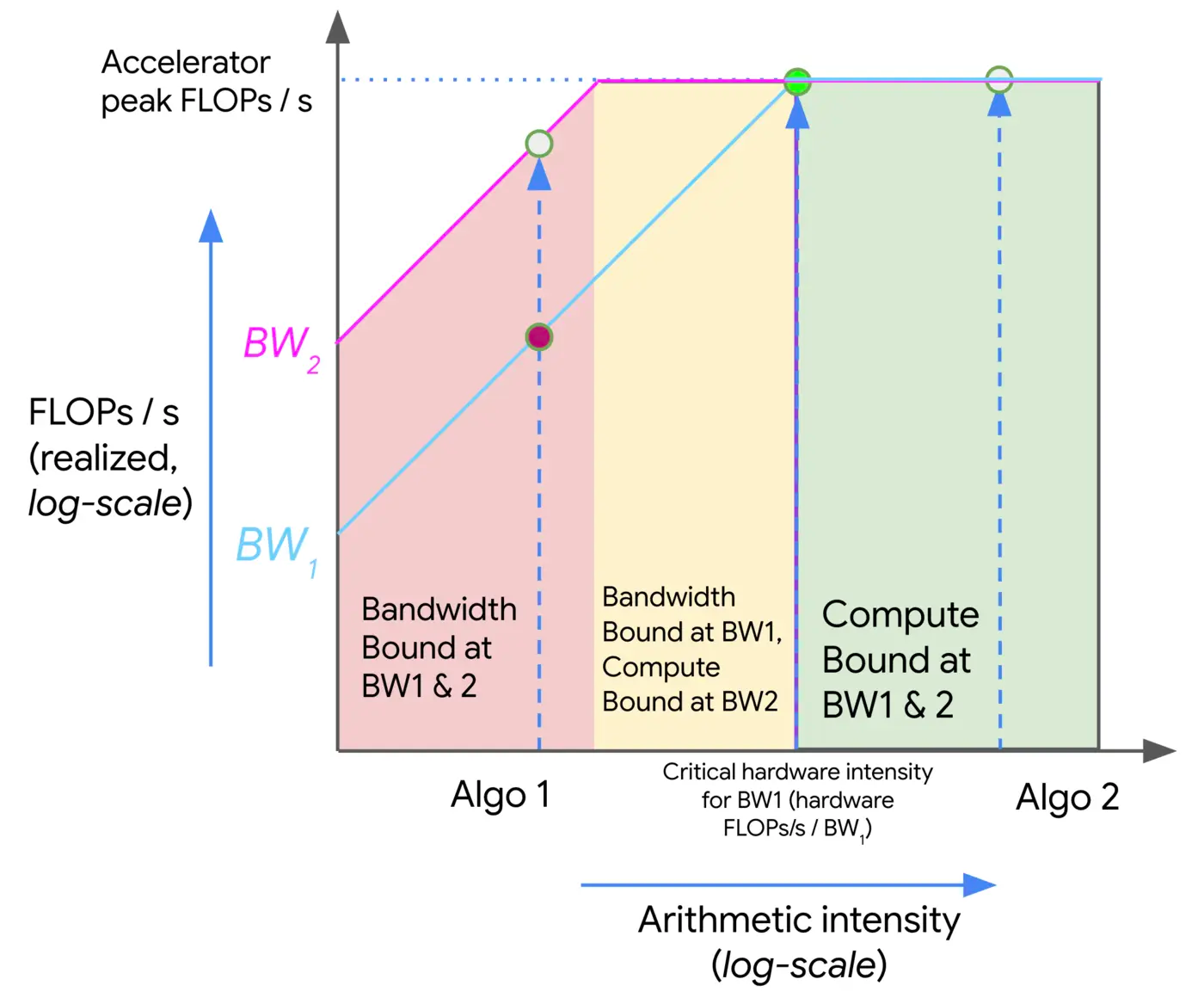
Above, as the intensity increases (moving left to right), we initially see a linear increase in the performance of our algorithm (in FLOPs/s) until we hit the critical arithmetic intensity of the hardware, 240 in the case of the TPU v5e. Any algorithm with a lower intensity will be bandwidth (BW) bound and limited by the peak memory bandwidth (shown in red). Any algorithm to the right will fully utilize our FLOPs (shown in green). Here, Algo 1 is comms-bound and uses only a fraction of the total hardware FLOPs/s. Algo 2 is compute-bound. We can generally improve the performance of an algorithm either by increasing its arithmetic intensity or by increasing the memory bandwidth available (moving from BW1 to BW2) in source
Matrix Multiplication
Given two matrices and , we can write where has shape , has shape , and has shape . To do the matmul we need to load bytes, perform FLOPs, and write bytes back in source
we’re multiplying two matrices:
- = Batch size (number of input rows)
- = Input dimension
- = Output dimension
The numerator (2BDF) represents the approximate number of mathematical operations.
The denominator (2BD+2DF+2BF) represents the bytes transferred for BF16 input matrices and output.
Meaning: Equation (7) tells us how many FLOPs we perform per byte transferred.
Suppose:
Since is much smaller than and , the term dominates the denominator.
We can approximate:
\boxed{I_{\text{matmul}}\approx B}\tag{8}
Meaning: When batch size is small relative to the matrix dimensions, arithmetic intensity is approximately equal to batch size
For , the arithmetic intensity is approximately 32 FLOPs/byte.
The article uses a TPU whose critical arithmetic intensity is 240 FLOPs/byte.
I_{\text{matmul}}>I_{\text{TPU}}\implies B>\frac{1.97\times10^{14}}{8.20\times10^{11}}=240\tag{9}
Since Equation (8) tells us , we can compare the batch size directly against 240.
- : Memory-bound -> the TPU spends more time transferring data than computing.
- : Compute-bound -> computation takes longer than memory transfer.
- : Near the crossover point.
This is an approximate threshold for the TPU v5e MXU, assuming the matrix dimensions are much larger than
Equation (7) calculates arithmetic intensity, Equation (8) simplifies it to approximately the batch size, and Equation (9) tells us how large that batch must be to make efficient use of the TPU’s compute throughput.
Takeaway: for a bfloat16 matmul to be compute-bound on most TPUs, we need our batch size to be greater than 240 (tokens) in source
Network Communication Rooflines
All the rooflines we’ve discussed so far have been memory-bandwidth rooflines, all within a single chip. This shouldn’t be taken as a rule. In fact, most of the rooflines we’ll care about in this book involve communication between chips: usually matrix multiplications that involve matrices sharded across multiple TPUs.
Not making further notes in this section because the details are about TPU and until I finish learning 3rd chapter from this book I can’t understand these details so I’ll fill the details later